Journeys analysed
0
Across all saved cards
Every journey compared against how long it normally takes on TfL, with each plausible refund candidate surfaced.
Add trips in one box: paste statement text, paste CSV, or drop a PDF/CSV file. The format is detected automatically and exact duplicates are skipped.
Paste TfL statement text or CSV rows, or drop a PDF/CSV statement file. New journeys merge into your saved data.
Tune screening, manage live TfL estimates and route baselines, and export or reset your data.
Tune how assertively the dashboard surfaces possible claims.
Current TfL disruptions across the tube, DLR, Overground and Elizabeth line. Refreshes automatically; journeys during a logged disruption are flagged in the results table.
Current screening result across all journeys.
Calculated delay by journey date.
Total fares recovered from successful refunds.
Top journeys with a usable baseline.
Results are recalculated instantly whenever journeys, baselines or settings change.
| Date | Journey | Actual | Baseline | Delay | Threshold | Fare | Result | Refund raised | Successful | Denied |
|---|
Useful when copied statement formatting is awkward.
These are the expected journey times. Live TfL estimates fill them automatically; edit any row to override.
Your journeys sync automatically to this device. Export a backup, restore one, or reset to the demo data.
If your Tube, DLR, Overground or Elizabeth line journey was delayed, TfL owes you money — but most people never claim. We find the delays worth claiming for, and it costs nothing to use.
Unlike other services, we never ask for your TfL password and never log in to your TfL account. You decide how much to share — use it completely anonymously, or sign up for more convenience.
Upload a statement (or paste it) and we analyse it right in your browser. Your journeys never leave your device. No account, no sign-up.
Create a free account (just an email) so your data is saved securely and follows you across devices. You choose what to store.
On a paid plan we automatically track and manage your journeys and flag every transaction worth claiming — and keep each claim's status up to date for you.
Download your journey history from TfL (CSV for Oyster, PDF for contactless) and import it here — or on a paid plan, forward your TfL emails and we do it for you.
We look up how long each journey normally takes using the live TfL API and flag any that ran over the refund threshold (15 min Tube/DLR, 30 min Elizabeth line/Overground), cross-checked against logged network disruptions.
Each candidate has a Claim button that opens TfL's official refund form. TfL makes the final decision and pays the refund straight back to your card.
Forward TfL's refund emails and we automatically mark each claim approved, credited or unsuccessful — no manual ticking.
The dashboard is free to use. Upgrade only if you want us to store your data and track your claims automatically.
Find and file claims yourself. Nothing stored on our servers.
Saved, synced and auto-tracked for one card.
For multi-card households who want it handled.
This tool is free and runs on a shoestring. If it has saved you money, a small tip helps cover hosting and keeps it free for everyone.
One-off tips of any size are hugely appreciated and go straight towards the AWS bill that powers the live TfL tracking.
Prefer to go Premium instead? See the Premium tab for ad-free use and automatic claim tracking.
How to get your journey history out of TfL and into this dashboard, and answers to common questions.
Go to account.tfl.gov.uk/my-account and sign in with the account that holds the Oyster or contactless card you travel with.
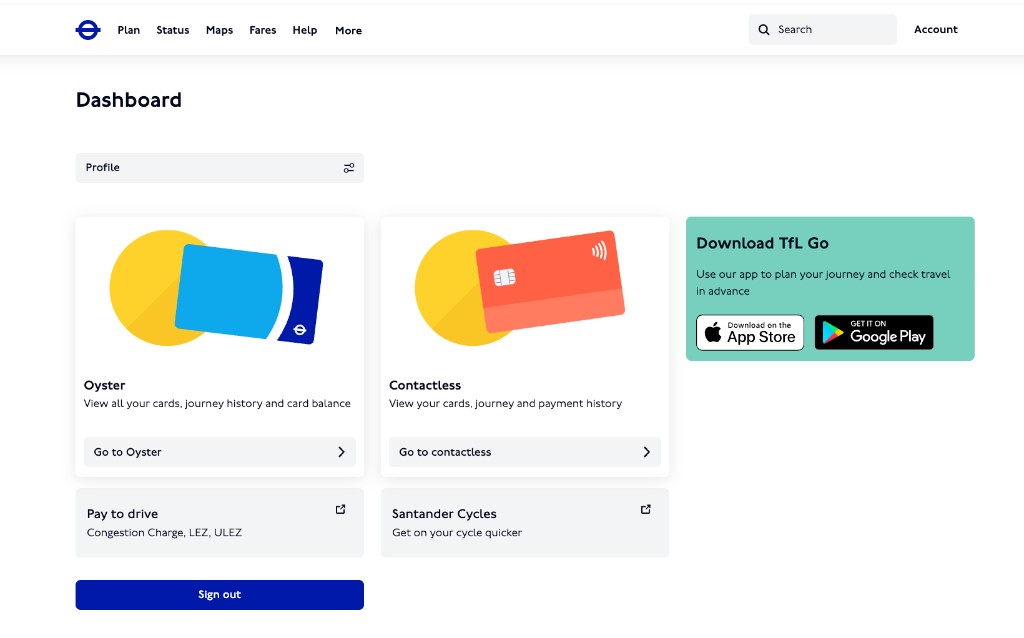
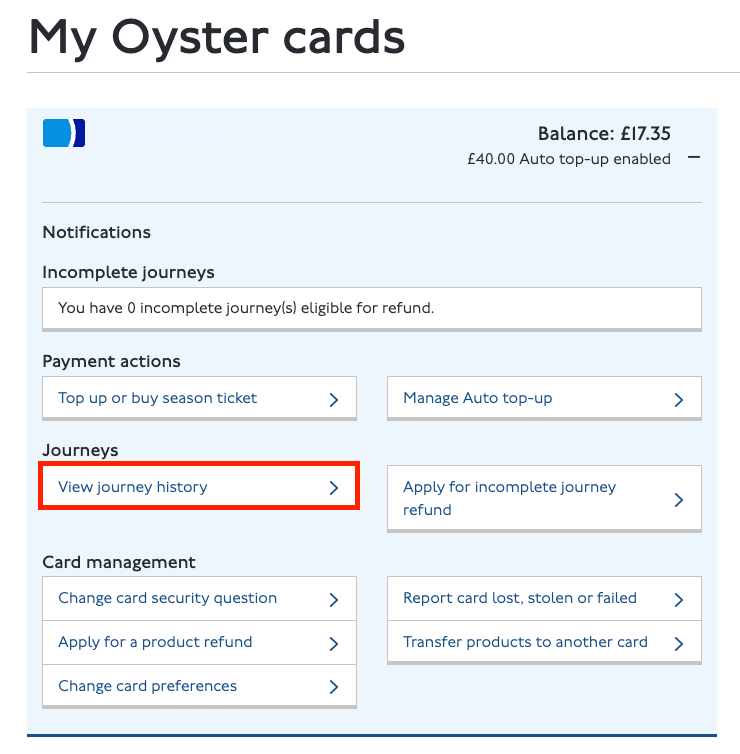
Open your Oyster or Contactless card from the account dashboard, then under Journeys select View journey history.
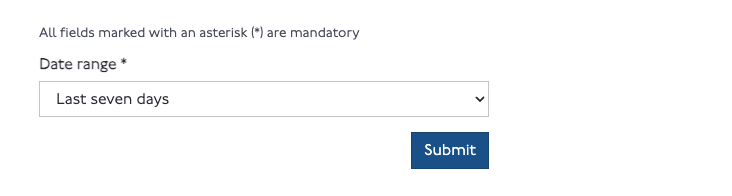
Choose the date range you want to check (for example the last seven days) and submit.
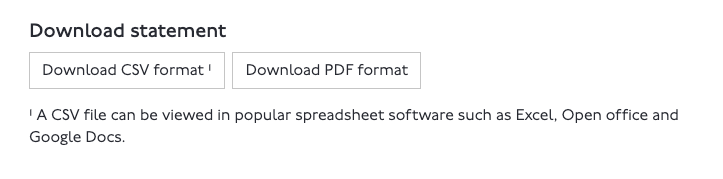
Oyster card: download the CSV — it includes the exact start and end tap times we need.
Contactless / credit or debit card: download the PDF. The contactless CSV does not include the full start and end times of each journey, so the PDF is required for an accurate delay calculation.
Then open the Import tab here and drop the file in; duplicates are skipped automatically.
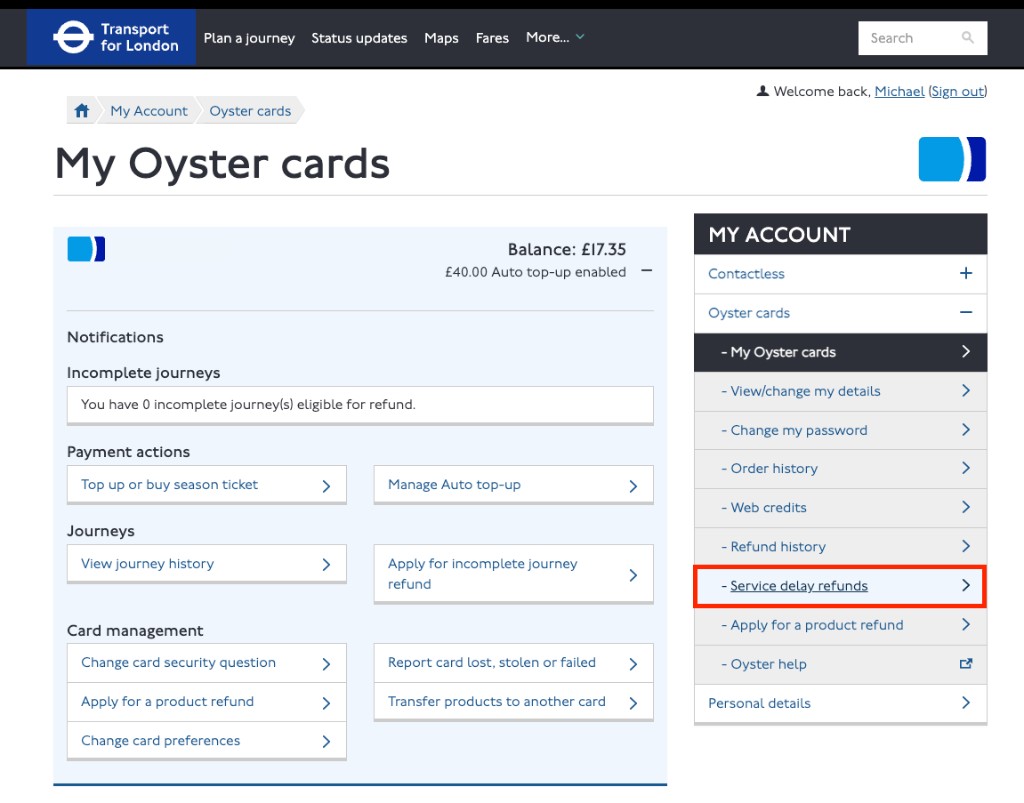
Back in your TfL account, select Service delay refunds in the My Account menu for your chosen Oyster or contactless payment card.
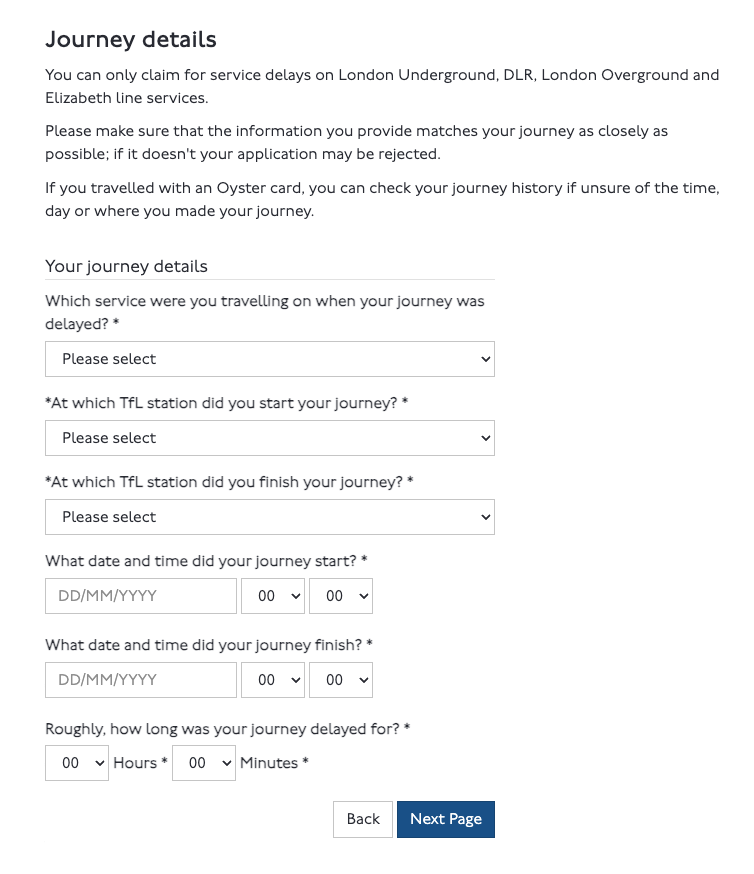
For each strong candidate, click Claim on the Dashboard to open TfL's Service Delay Refund form, then copy across the service, stations, dates, times and delay length shown in your results table.
Yes. Journeys are stored in your browser and synced to a private record keyed to this device. The public demo ships with sample data only, never anyone's real journeys.
TfL offers a Service Delay Refund when your journey was delayed 15 minutes or more on the Tube or DLR, or 30 minutes or more on the Elizabeth line or London Overground. You must claim within 28 days.
Live TfL journey estimates run automatically in the background: each station is resolved via the TfL API and your actual time is compared against the fastest planned journey. You can override any expected time under Settings → Route baselines.
A scheduled job records TfL line disruptions every few minutes. If one of your journeys overlapped a logged disruption on its line, it gets a flag — a stronger signal that a claim is justified.
For an Oyster card, use the CSV — it lists exact start and end tap times. For a contactless or credit/debit card, use the PDF: the contactless CSV omits the full start and end times of each journey, so only the PDF gives an accurate delay calculation.
No. A journey is treated as a duplicate when the card, date, route and both tap times match an existing one, so re-importing is safe.
No. It is an assertive screening tool. Only submit journeys you actually took and describe disruptions honestly; TfL uses its own timetable and operational records when deciding a claim.